
Raycast
A keyboard-first launcher and shortcut to everything, with extensions, utilities and built-in AI for Mac and Windows.مشغّل سريع يعمل بلوحة المفاتيح واختصار لكل شيء، مع إضافات وأدوات وذكاء اصطناعي مدمج لـ Mac وWindows.
 Added byأضافها MolierOwnerالمالكListedأُدرجت Nov 26, 202626 نوفمبر 2026
- Pricingالتسعير
- Freemiumمجاني جزئياً · From $10/mo · ابتداءً من $10/شهر
- Categoryالتصنيف
- AI Productivityالإنتاجية
- Pricing checkedآخر تحقق من السعر
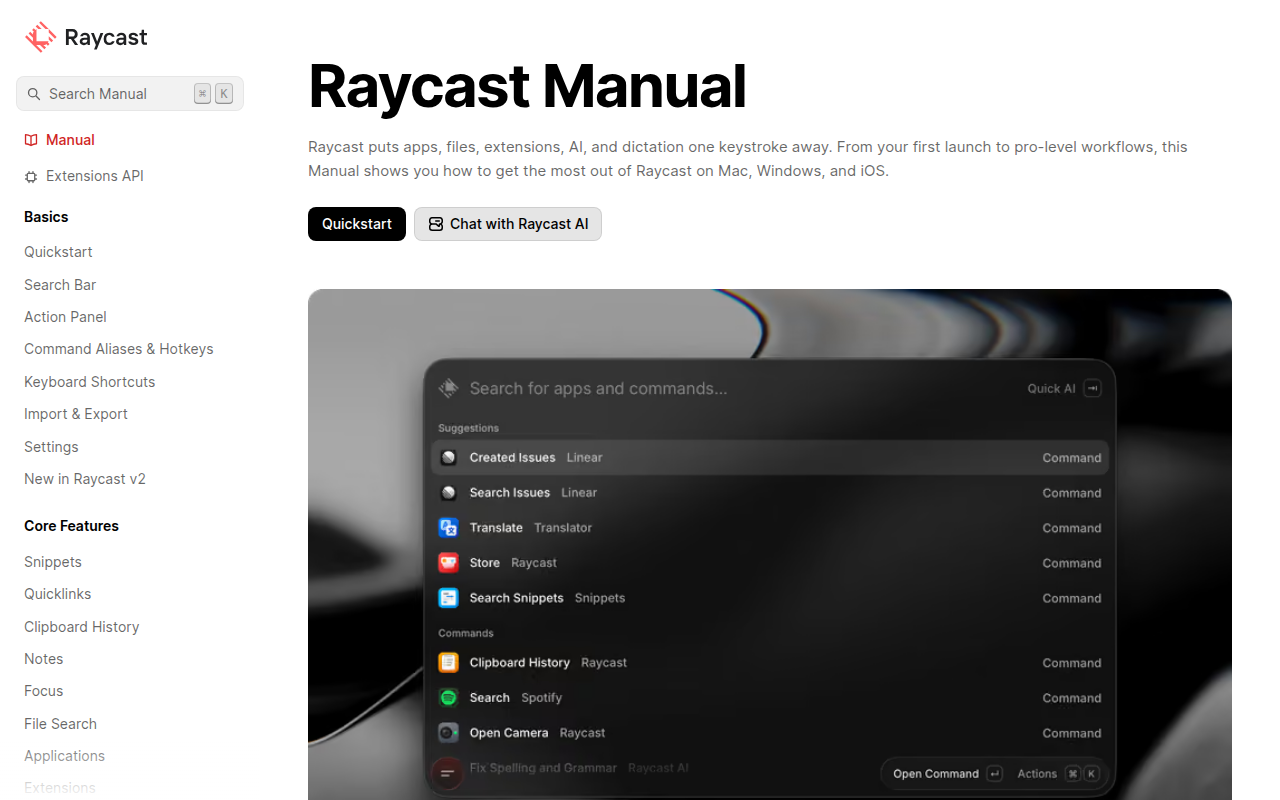
Raycast is a productivity launcher for Mac and Windows. People use it to open apps and files, search clipboard history, expand snippets, manage windows and run thousands of extensions from one command bar. The core is free; Pro adds Raycast AI, cloud sync and unlimited clipboard history.Raycast هو مشغّل إنتاجية لـ Mac وWindows. يستخدمه الناس لفتح التطبيقات والملفات والبحث في سجل الحافظة وتوسيع المقاطع النصية وإدارة النوافذ وتشغيل آلاف الإضافات من شريط أوامر واحد. الأساس مجاني، وتضيف خطة Pro ذكاء Raycast الاصطناعي والمزامنة السحابية وسجل حافظة غير محدود.
Featuresالمزايا
- Root search for apps, files, commands and extensions from one keyboard-first launcher
- Thousands of extensions from the Store, plus custom extensions and developer tooling
- Built-in utilities including clipboard history, Quicklinks, calculator, snippets and window management
- Raycast AI with Quick AI, AI Chat, agents, AI Commands, AI Extensions and screen awareness
- Raycast Notes for capturing notes inside the launcher
- Pro adds cloud sync, dictation, translator and custom themes across devices
- بحث شامل عن التطبيقات والملفات والأوامر والإضافات من مشغّل واحد يعمل بلوحة المفاتيح
- آلاف الإضافات من المتجر، إضافة إلى إضافات مخصصة وأدوات للمطورين
- أدوات مدمجة تشمل سجل الحافظة وQuicklinks والآلة الحاسبة والمقاطع النصية وإدارة النوافذ
- ذكاء Raycast الاصطناعي مع Quick AI ومحادثة ووكلاء وأوامر ذكاء اصطناعي ووعي بالشاشة
- ملاحظات Raycast Notes لتدوين الملاحظات داخل المشغّل
- تضيف Pro المزامنة السحابية والإملاء والمترجم والسمات المخصصة عبر الأجهزة
Pricingالأسعار
Freemium · Free plan available · Paid plans from $10/mo
Core features including clipboard history, Quicklinks, calculator, snippets and window management, plus thousands of extensions
500 AI credits a month, cloud sync, dictation, translator, custom themes and unlimited clipboard history; $96/year on annual billing
3,000 AI credits a month and top-tier AI models, on top of Pro
7,500 AI credits a month and top-tier AI models, the highest individual tier
Pro features per user with shared commands, Quicklinks and snippets for teams
مجاني جزئياً · تتوفر خطة مجانية · الخطط المدفوعة تبدأ من $10/شهر
مزايا أساسية تشمل سجل الحافظة وQuicklinks والآلة الحاسبة والمقاطع وإدارة النوافذ وآلاف الإضافات
500 رصيد ذكاء اصطناعي شهرياً ومزامنة سحابية وإملاء ومترجم وسمات مخصصة وسجل حافظة غير محدود؛ $96 سنوياً عند الدفع السنوي
3,000 رصيد ذكاء اصطناعي شهرياً ونماذج ذكاء اصطناعي من الفئة العليا فوق Pro
7,500 رصيد ذكاء اصطناعي شهرياً ونماذج من الفئة العليا، وهي أعلى فئة فردية
مزايا Pro لكل مستخدم مع أوامر وروابط ومقاطع مشتركة للفرق

MAKW editorial rating · based on features, pricing and free tierتقييم MAKW التحريري · بناءً على المزايا والأسعار والخطة المجانية
Generous free plan; transparent pricing (5 published plans); advanced options sit in paid tiers (from $10/mo).خطة مجانية سخية؛ أسعار معلنة بوضوح (5 خطط)؛ الخيارات المتقدمة في الخطط المدفوعة (من $10/شهر).
Listed on MAKWمدرجة على MAKW
Tool owners can add this badge to their site:يمكن لأصحاب الأداة إضافة هذه الشارة إلى موقعهم:
[](https://makw.com/raycast)Live tool cardبطاقة أداة حية
Or embed a live tool card on your site:أو ضمّن بطاقة أداة حية في موقعك:
<iframe src="https://makw.com/embed/raycast" width="420" height="150" frameborder="0" loading="lazy"></iframe>